Stock ticker
A live stock price on your wall that updates itself all day — not a phone app you have to unlock and refresh. The stocks.ticker widget, provided by the stocks package in the led-ticker-plugins monorepo (type = "stocks.ticker"), shows live prices — symbol, price, change, and a rolling sparkline — auto-picking a scrolling crawl, a held card, or a full dashboard to fit your sign’s real width. Prices come from Finnhub by default (US equities, free tier) or, with one config field, from Twelve Data (provider = "twelvedata") for stocks and forex and crypto off a single free key. The same package also contributes a stocks.quote value-token source and a stocks.trend color provider, so a live, trend-colored price can drop into any message widget too — that’s the part a phone app or a standalone ticker gadget can’t do: your stock feed sharing the same rotation as everything else on the sign.
The default Finnhub path is US-listed equities-only — config-load declines any symbol containing / (the conventional forex/crypto pair separator, e.g. "EUR/USD") under provider = "finnhub", the default. Set provider = "twelvedata" and the same symbols list can mix stocks, forex ("EUR/USD"), and crypto ("BTC/USD") — the / is what routes the asset class; see Multi-asset via Twelve Data below and Data sources for the full picture. A few places this shows up: a home trading desk keeping a handful of positions in view, an office or lobby sign mixing market data into the daily rotation, or a storefront running its own stock as a conversation piece — the sample symbol used throughout this page, DKS, is Dick’s Sporting Goods, a deliberate storefront hint.

Requires led-ticker-core >= 4.9.
Install the plugin first (steps just below this snippet), then drop it into a section:
[[playlist.section]]mode = "slideshow"hold_time = 5
[[playlist.section.widget]]type = "stocks.ticker"symbols = ["DKS", "MSFT", "NVDA"]
To install the plugin on a Docker deploy, add its line to the plugin manifest and restart:
# First plugin? Create your manifest from the example:cp -n config/requirements-plugins.example.txt config/requirements-plugins.txt# Add the package (one name per line), then restart:echo "led-ticker-stocks==0.6.0" >> config/requirements-plugins.txtdocker compose restartOther install paths (web UI Store tab, dev checkout) are on the Plugins page.
Try it in demo mode
Section titled “Try it in demo mode”Set demo = true to render a synthetic random-walk feed instead of calling Finnhub — no FINNHUB_API_TOKEN needed, no internet required:
[[playlist.section]]mode = "slideshow"hold_time = 5
[[playlist.section.widget]]type = "stocks.ticker"symbols = ["DKS", "MSFT", "NVDA", "TSLA"]demo = true
This is the fastest way to see every layout, the price-flash, and the LIVE-chip pulse before you have a Finnhub token — or on a dev machine with no network access.
One ticker, every sign
Section titled “One ticker, every sign”layout (omit it — the default) resolves at draw time from the sign’s real physical width, so the same config works unmodified whether it’s driving a narrow bar, a square-ish panel, or a long dashboard-shaped sign. You can also pin a layout explicitly with layout = "crawl" / "card" / "dashboard".
A small ~160×16 bar → crawl
Section titled “A small ~160×16 bar → crawl”
[[playlist.section]]mode = "ticker"
[[playlist.section.widget]]type = "stocks.ticker"symbols = ["DKS", "MSFT", "NVDA", "TSLA"]demo = trueupdate_interval = 1
A single-line, continuously-scrolling crawl through every configured symbol. This is the layout on a narrow sign where there’s no room for a held card.
A wide ~256×64 panel → card
Section titled “A wide ~256×64 panel → card”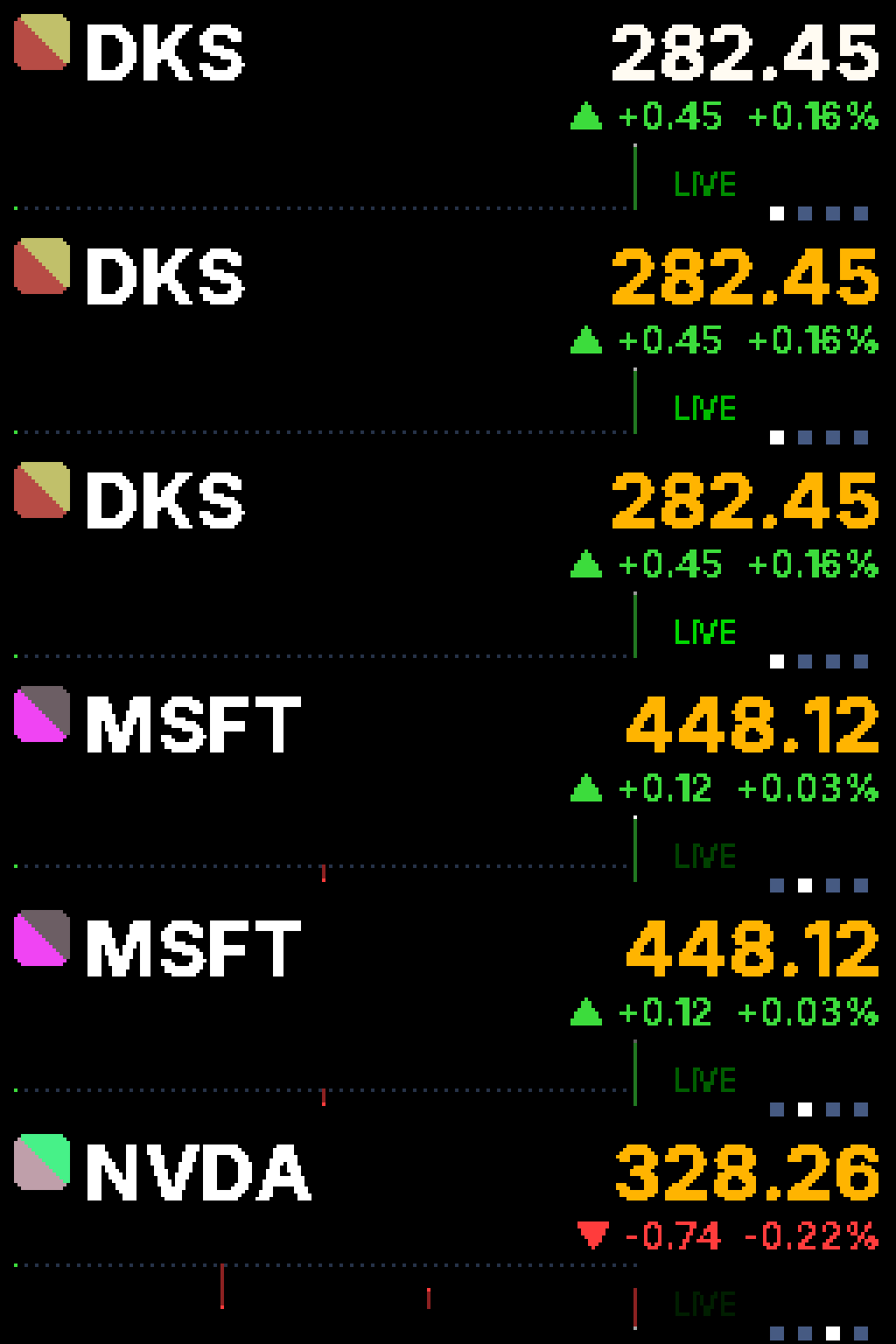
[[playlist.section]]mode = "slideshow"hold_time = 5
[[playlist.section.widget]]type = "stocks.ticker"symbols = ["DKS", "MSFT", "NVDA", "TSLA"]demo = trueupdate_interval = 1
One symbol at a time, held and rotating: a hero price card with a sparkline, a state chip, and paging dots.
A long ~512×64 panel → dashboard
Section titled “A long ~512×64 panel → dashboard”Same config, just a longer symbol list on a wider physical panel — see the hero GIF at the top of this page. The dashboard layout adds a scrolling watch column of the rest of the list alongside the held hero card, so a long sign can show one symbol in detail while still surfacing the others.
[[playlist.section]]mode = "slideshow"hold_time = 5
[[playlist.section.widget]]type = "stocks.ticker"symbols = ["DKS", "MSFT", "NVDA", "TSLA", "AMZN", "GOOGL", "META", "AMD"]demo = trueupdate_interval = 1
One config; the layout auto-selects from the sign’s real width — no layout field needed. There’s no hard cutoff to memorize: a narrow ~160px-wide sign gets crawl, a mid-width ~256px sign gets card, and anything ~400px and wider gets dashboard.
Embed a live price anywhere
Section titled “Embed a live price anywhere”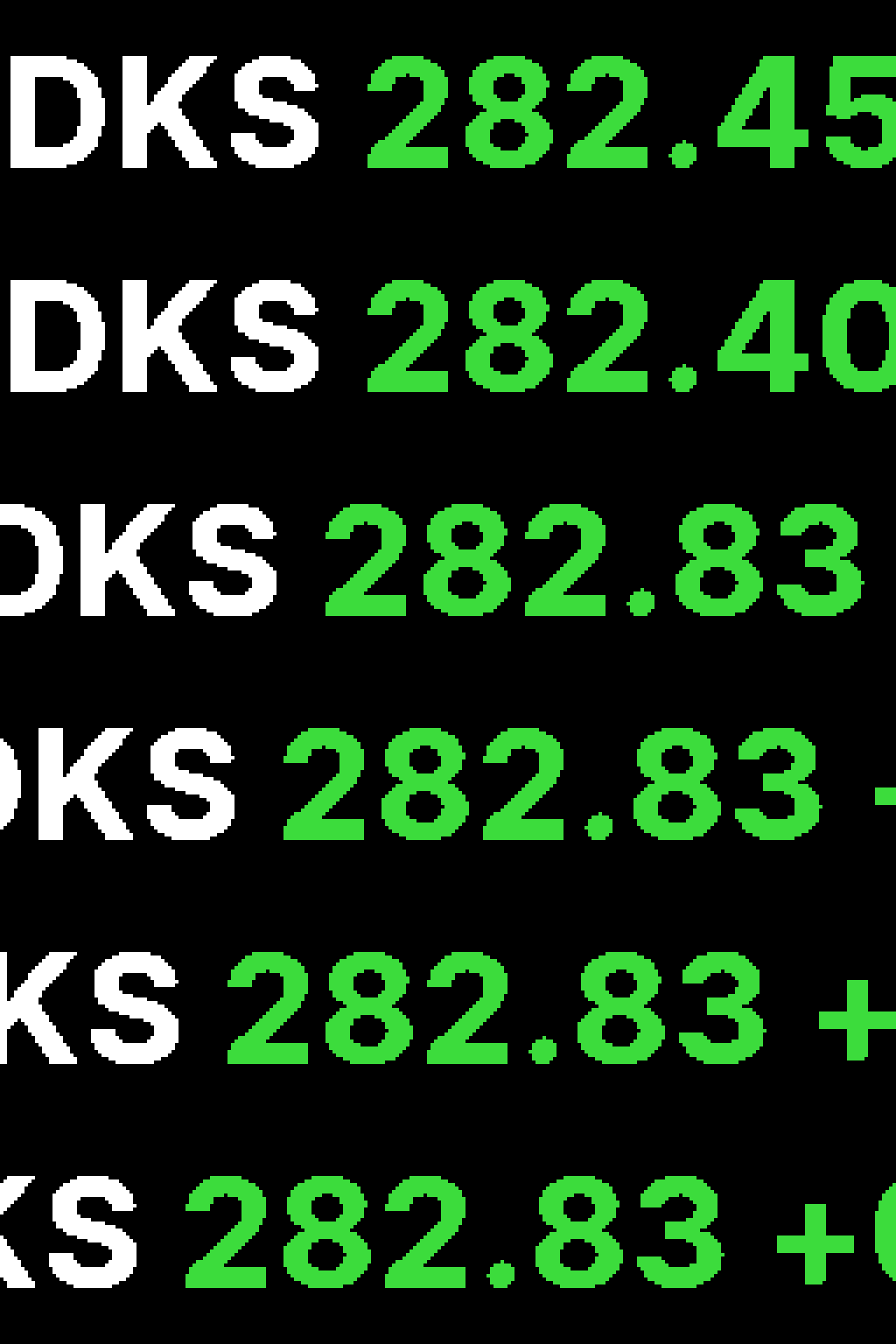
Declare a stocks.quote source once, then reference its :id: token in any message widget’s text:
[[source]]id = "stocks.dks"type = "stocks.quote"symbol = "DKS"interval = 1format = "{price} {pct}"color = {style = "stocks.trend", symbol = "DKS"}
[[playlist.section]]mode = "slideshow"hold_time = 8
[[playlist.section.widget]]type = "message"text = "DKS :stocks.dks:"font = "Inter-Bold"font_size = 44font_threshold = 80font_color = [255, 255, 255]
The :stocks.dks: token renders in the source’s own color — here the stocks.trend provider, which tints green when the symbol is up on the day and red when it’s down — while the literal "DKS " text keeps the message’s font_color. That’s mixed colors on one line, in your own font and layout, not a fixed widget appearance.
A few things to know before you reach for this:
- Requires led-ticker-core >= 4.14.0. Source-declared token color is a core capability (see Value tokens → Token color); on an older core the token still resolves, but it renders in the message’s own
font_colorinstead of the source’s. messagewidgets only, for now.two_rowand the text overlay ongif/imagewidgets don’t read a source’scoloryet — the token there always renders in the widget’s own color. This is a documented, planned follow-up on the core side, not a stocks-plugin limitation.- The symbol needs a feeder.
stocks.trendandstocks.quoteboth read a shared, process-wide quote cache — they don’t fetch on their own. Something in the same config has to be feedingDKSinto that cache: either astocks.quotesource for that symbol (as above) or astocks.tickerwidget that includes it in itssymbolslist. Reference a symbol nobody feeds and the token still resolves (a placeholder, then a flat zero-change price), just never colored by real trend data.
See Value tokens for the general :id: token mechanism and Color providers for the other font_color/color forms stocks.trend sits alongside.
Live stocks in a real playlist
Section titled “Live stocks in a real playlist”
Stocks widgets are just widgets — they sit in the same rotation as your everyday content, not a special standalone mode:
[[source]]id = "stocks.dks"type = "stocks.quote"symbol = "DKS"interval = 1format = "{price} {pct}"
[[playlist.section]]mode = "slideshow"hold_time = 3[[playlist.section.widget]]type = "message"text = "MARKETS TODAY"font = "Inter-Bold"font_size = 40font_threshold = 80font_color = [255, 183, 3]
[[playlist.section]]mode = "slideshow"hold_time = 4[[playlist.section.widget]]type = "stocks.ticker"symbols = ["DKS"]demo = trueupdate_interval = 1
[[playlist.section]]mode = "slideshow"hold_time = 4[[playlist.section.widget]]type = "two_row"top_text = "DKS"top_font = "Inter-Bold"top_font_size = 24top_color = [255, 255, 255]bottom_text = ":stocks.dks:"bottom_font = "Inter-Bold"bottom_font_size = 24bottom_font_threshold = 80bottom_color = {style = "stocks.trend", symbol = "DKS"}
Three sections, each on mode = "slideshow": a plain welcome message, the live stocks.ticker card, and a two_row header where the bottom row is an embedded :stocks.dks: token colored directly by bottom_color — the same per-row color field described on Color providers. Your regular content and a live market feed share one rotation with no special wiring between them. (The font/font_size fields above are hi-res too — see the scale-1 note if you’re on a small panel.)
It’s alive
Section titled “It’s alive”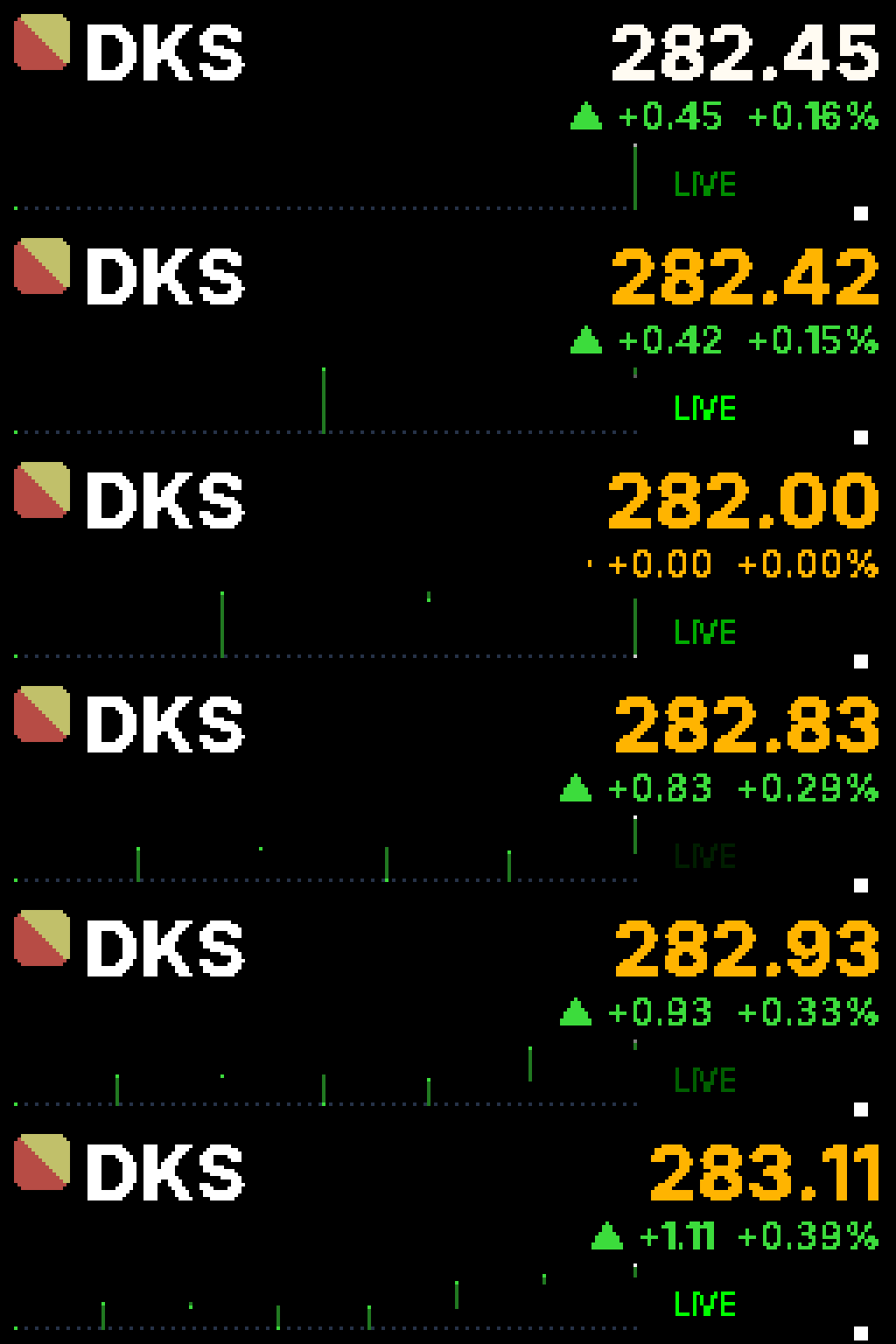
[[playlist.section]]mode = "slideshow"hold_time = 13
[[playlist.section.widget]]type = "stocks.ticker"symbols = ["DKS"]demo = trueupdate_interval = 1
Held layouts (card, dashboard) aren’t a static snapshot redrawn every poll — three things animate continuously, frame by frame:
- Price flash. When a symbol’s price changes, the price line flashes whiter for a moment before decaying back to its trend color — a Bloomberg-style “something just moved” cue, not just a number that jumps.
- LIVE-chip pulse. The state chip in the corner reads
LIVE(green) while the market is open,PRE(amber) orAH(violet) outside regular hours, andCLSD(red, dimmed) when closed. OnlyLIVEbreathes — a slow brightness pulse that’s the visual “this widget is actually polling,” the same idea as the busy-light overlay’s corner dot. - Sparkline endpoint pulse. The rightmost point of the rolling sparkline twinkles every frame regardless of market state, so the chart itself reads as alive even between price updates.
Multi-asset via Twelve Data
Section titled “Multi-asset via Twelve Data”Add one field — provider = "twelvedata" — and the same widget mixes stocks, forex, and crypto in one symbols list, all off a single free key:
[[source]]id = "eurusd"type = "stocks.quote"provider = "twelvedata"symbol = "EUR/USD"format = "{price}"
[[playlist.section]]mode = "slideshow"hold_time = 5
[[playlist.section.widget]]type = "stocks.ticker"provider = "twelvedata"symbols = ["AAPL", "EUR/USD", "BTC/USD"]- The
/routes the asset class, no exchange prefix."AAPL"is a stock,"EUR/USD"is forex,"BTC/USD"is crypto — Twelve Data infers the type from the symbol shape alone. - Per-symbol market state. Each symbol carries its own state chip —
BTC/USDcan readLIVEaround the clock while an after-hoursAAPLreadsCLSD, in the same rotation. - Auto-formatting needs no config. Prices pick their decimal places from magnitude — forex (
EUR/USD~1.08) renders at 4 decimals, equities and larger crypto values render at 2 with thousands separators (65,432.10). Thedecimalsfield onstocks.quoteoverrides this per source for the rare case you want something else. - The rate just works. The shared cache detects your Twelve Data key’s actual per-minute limit at boot and throttles to it — free-tier and a paid key both just work, with no rate field to tune.
- Get a free key at twelvedata.com/pricing and put it in
.envasTWELVEDATA_API_KEY— never inconfig.toml(env-only, same convention asFINNHUB_API_TOKEN).
Options
Section titled “Options”stocks.ticker widget
Section titled “stocks.ticker widget”| Field | Type | Default | Notes |
|---|---|---|---|
provider | "finnhub" / "twelvedata" | "finnhub" | Which quote provider to poll. "finnhub" covers US equities; "twelvedata" adds forex and crypto — see Data sources. |
symbols | list of str | required | Ticker symbols, e.g. ["DKS", "MSFT"]. A symbol containing / (e.g. "EUR/USD") is rejected at config-load under the default provider = "finnhub"; valid under provider = "twelvedata" — see Data sources. |
layout | "crawl" / "card" / "dashboard" | auto | Explicit override. Omit it to auto-select from the sign’s real physical width — see One ticker, every sign. |
green_up | bool | true | When true (default), a positive change renders green and a negative change renders red. Set false to swap the two colors (some non-US market conventions); the ▲/▼ arrow direction itself never changes. |
update_interval | int, seconds | 60 | Base poll cadence (both providers). The actual cadence widens automatically to at least len(symbols) + 1 seconds — see Data sources for why. |
padding | int, pixels | 6 | End padding on the crawl layout only (spacing before the next symbol scrolls in); no effect on card/dashboard. |
demo | bool | false | Render a synthetic random-walk feed instead of calling Finnhub. No token needed — see Try it in demo mode above. |
stocks.quote source
Section titled “stocks.quote source”| Field | Type | Default | Notes |
|---|---|---|---|
symbol | str | required | The ticker to track, e.g. "DKS". Rejected at config-load if it contains / (e.g. "EUR/USD") under the default provider = "finnhub"; valid under provider = "twelvedata". |
provider | "finnhub" / "twelvedata" | "finnhub" | Which quote provider this token reads. Same Data sources tradeoffs as the widget’s provider field. |
format | str | "{price}" | A Python format string over: price, change, pct, arrow (▲/▼/·), symbol, prev, high, low, day_range. Validated at config-load — an unknown field name or malformed format raises. |
decimals | int | auto | Fixed decimal places for price/change/prev/high/low. Unset (the default): Finnhub always shows 2; Twelve Data auto-picks by magnitude (forex ~4, sub-$1 ~5, equities/larger crypto 2) — see Multi-asset via Twelve Data. |
placeholder | str | "…" | Shown until the first quote arrives. |
interval | int, seconds | — | Inherited from the general polled-source mechanism — how often this source’s own fetch runs. See Value tokens → Live (polled) sources. |
color | any color provider | — (inherits host widget’s color) | Also inherited — see Value tokens → Token color. {style = "stocks.trend", symbol = "..."} is the natural pairing for a stocks token. |
stocks.trend color provider
Section titled “stocks.trend color provider”Used as a font_color (on message) or color (on a [[source]] block, or top_color/bottom_color on two_row):
| Field | Type | Default | Notes |
|---|---|---|---|
symbol | str | required | Which symbol’s day-change to track — a plain ticker or a / forex/crypto pair (e.g. "EUR/USD") both work here, since this provider only reads the shared cache. Must already be fed by a stocks.quote source or stocks.ticker widget — see Embed a live price anywhere. |
up | [r, g, b] | [60, 220, 60] (green) | Color when the symbol is up on the day. |
down | [r, g, b] | [255, 60, 60] (red) | Color when the symbol is down on the day. |
flat | [r, g, b] | [150, 150, 150] (gray) | Color when unchanged or no data yet. |
green_up | bool | true | Set false to swap up/down, matching the same knob on stocks.ticker. |
font_color = {style = "stocks.trend", symbol = "DKS", up = [0, 255, 0], down = [255, 0, 0]}Data sources
Section titled “Data sources”The plugin polls one of two providers, chosen by provider (default "finnhub"). Every stocks.ticker widget and stocks.quote source in a config shares one process-wide quote cache — a symbol is fetched once per poll cycle no matter how many widgets/tokens reference it, and adding a second widget or token for a symbol you’re already tracking costs nothing extra. Use one provider consistently across a config: the first widget/source to start the shared cache decides which provider handles every symbol in the process.
Finnhub (default)
Section titled “Finnhub (default)”Quotes come from Finnhub, a market-data API with a free tier, for US equities:
- Sign up free at finnhub.io/register.
- Copy the API key from your Finnhub dashboard.
- Add it to the
.envfile that sits next to your config — notconfig.tomlitself:FINNHUB_API_TOKEN=your_key.
Never put the token in config.toml — a token field in a widget block is accepted for backward compatibility but silently ignored; the token always resolves from the environment. No token, or demo = true on any stocks widget in the config, falls back to the offline demo feed described above.
A few behaviors worth knowing before you deploy against real markets:
- Equities only. Config-load declines a symbol that looks like a forex or crypto pair (contains
/, e.g."EUR/USD") under the defaultprovider = "finnhub"— switch that symbol’s widget/source toprovider = "twelvedata"instead (see Multi-asset via Twelve Data above). - Cadence widens with your symbol list. The poll interval is
max(update_interval, number_of_symbols + 1)seconds, recomputed every cycle — a longsymbolslist automatically slows down to stay inside Finnhub’s free-tier rate limit (60 requests/minute per token) rather than requiring you to hand-tuneupdate_intervalyourself. - Closed-market behavior. When the market is closed, prices hold at the last fetched close instead of going blank or re-fetching every cycle — a symbol still gets exactly one fetch after a fresh boot (to grab that last close), then holds until the market reopens.
Twelve Data (provider = "twelvedata")
Section titled “Twelve Data (provider = "twelvedata")”Set provider = "twelvedata" on a stocks.ticker widget or stocks.quote source to poll Twelve Data instead — one free key covering stocks, forex, and crypto:
- Get a free key at twelvedata.com/pricing.
- Add it to
.env, next to your config, asTWELVEDATA_API_KEY=your_key— never inconfig.toml(same env-only convention asFINNHUB_API_TOKEN).
Each quote carries its own market-open flag, so a mixed symbols list shows correct per-symbol state — crypto can read LIVE around the clock while an after-hours equity in the same list reads CLSD. You don’t set a rate: on first use, the shared cache calls Twelve Data’s /api_usage endpoint to detect your key’s actual per-minute limit (free tier is 8 requests/minute) and throttles to it automatically; a paid key is detected and used at its own higher limit with no config change, and an unexpected 429 ratchets the rate down further for the rest of the session as a safety net. Free-tier data is delayed roughly 1–15 minutes — fine at sign-refresh cadence, not for tick-by-tick trading.
If it doesn’t work
Section titled “If it doesn’t work”- Nothing shows up at all — a blank panel. Most likely the widget block isn’t nested inside a
[[playlist.section]]— a bare[[playlist.section.widget]]with no section parent yields zero sections and a blank sign; every runnable snippet on this page shows the wrapper. Also worth ruling out: thestocksplugin isn’t installed yet (see the install step near the top of this page) — though a missing plugin usually surfaces asunknown widget type 'stocks.ticker'at config-load rather than a silent blank panel. - A
:stocks.xyz:token shows no color — it’s whatever color the widget already was. Either the symbol has no feeder in this config (add astocks.quotesource or include it in astocks.tickerwidget’ssymbols), or you’re on core < 4.14.0 (source-declared token color needs core >= 4.14.0 — see Embed a live price anywhere). - The whole line renders in one flat color, not per-token. Same core-version check as above — an older core resolves the token’s text correctly but ignores the source’s
colorfield entirely. - A symbol shows an em-dash (
—) price, or astocks.trendtoken stays gray. The symbol has no data yet (first fetch still in flight) or the provider returned nothing for it — double-check the symbol is spelled correctly and is real and currently listed (or, for a/pair, thatprovider = "twelvedata"is set). stocks.ticker: '<symbol>' looks like forexat config-load. A symbol containing/isn’t served under the defaultprovider = "finnhub"— setprovider = "twelvedata"on that widget/source instead (see Multi-asset via Twelve Data), or remove the symbol.
Haven’t tried it yet? Try it in demo mode above takes about two minutes, no key and no network. From there, the Plugins page has the full catalog entry alongside the rest of the plugins. Implementation notes and the layout design handoff live in the stocks package README if you want to go deeper.