flair.lottery widget
The flair.lottery widget is provided by the flair package in the led-ticker-plugins monorepo, referenced in config as type = "flair.lottery". N labeled balls roll in from off-canvas left, one at a time in a staggered relay — each ball visibly tumbles as it travels — and settles flat, upright, into an evenly spaced slot across the panel. It’s a physical lottery-ball draw rendered as a held widget: words, prize numbers, raffle picks, whatever you want revealed one ball at a time.
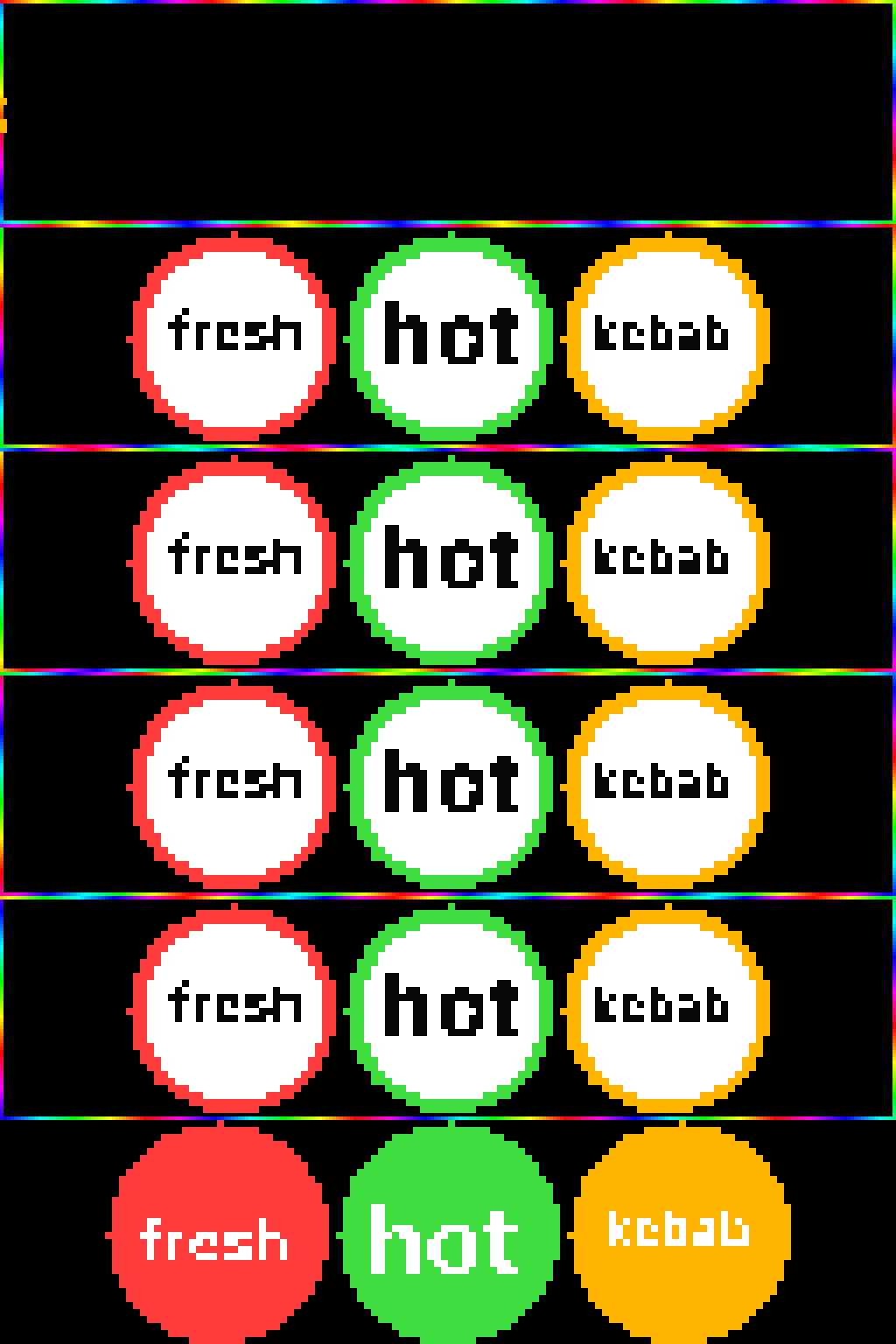
Requires led-ticker-core >= 4.10 and a scaled display (bigsign only) — the balls paint at physical resolution using the same hi-res machinery as inline emoji and hi-res fonts. On an unscaled display (smallsign, default_scale = 1) the widget logs a warning once and paints nothing; led-ticker validate also warns at config-load time, so this surfaces before deploy rather than as a blank section on the sign.
[[playlist.section.widget]]type = "flair.lottery"words = ["fresh", "hot", "kebab"]ball_style = "classic"border = "rainbow"To install the plugin on a Docker deploy, add its line to the plugin manifest and restart:
# First plugin? Create your manifest from the example:cp -n config/requirements-plugins.example.txt config/requirements-plugins.txt# Add the package (one name per line), then restart:echo "led-ticker-flair" >> config/requirements-plugins.txtdocker compose restartOther install paths (web UI Store tab, dev checkout) are on the Plugins page.
Both ball styles
Section titled “Both ball styles”ball_style = "classic"(default) — a white face with a colored rim ring and dark text, like a real lottery ball.ball_style = "solid"— a solid color-filled face with white text.
[[playlist.section.widget]]type = "flair.lottery"words = ["fresh", "hot", "kebab"]ball_style = "solid"colors = [[255, 60, 60], [60, 220, 60], [255, 180, 0]]Options
Section titled “Options”| Field | Type | Default | Notes |
|---|---|---|---|
words | list of str, 1-8 | required | One ball per word, in reading order. Each word must be a non-empty string; led-ticker validate catches empty entries and lists over 8. |
ball_style | "classic" / "solid" | "classic" | See “Both ball styles” above. |
colors | list of [r, g, b] | auto-palette | Must be the same length as words if given — colors the rim ring (classic) or the fill (solid). Omit it to cycle an 8-color built-in palette (red, green, amber, blue, magenta, cyan, orange, violet), repeating past 8 words. |
roll_ms | int >= 100 | 800 | Wall-clock roll duration for a single ball’s staggered-relay window. Total reveal time for n balls is roughly n × roll_ms. |
choreography | "rack_fill" / "roll_through" | "rack_fill" | Entry order — see Choreography below. Requires flair >= 0.6.0. |
font | str | "Inter-Bold" | Hi-res font used for each ball’s label — see Fonts for the bundled hi-res catalog. |
border | any core border spec | none | Same border field as message / countdown / two_row / etc — paints the panel perimeter, not the balls. See Borders. |
Behavior notes
Section titled “Behavior notes”Choreography — rack-fill or roll-through
Section titled “Choreography — rack-fill or roll-through”Two entry orders, selected by choreography (flair >= 0.6.0):
"rack_fill"(default): the first ball to roll lands in the rightmost slot, the next stops one slot short, and so on — no rolling ball ever crosses a ball that’s already settled. Reveal order is right-to-left (the last word inwordslands first)."roll_through": balls fill left-to-right in word order, and each later ball visibly rolls in front of the settled balls it passes on its way to its slot — a busier, more chaotic lottery-machine look.
In both modes the final display always reads words left-to-right, unchanged — word index and slot index are the same throughout; only the timing of which slot fills first differs.
Derived sizing — no size knobs
Section titled “Derived sizing — no size knobs”There’s no ball_size / diameter field. Ball diameter and slot spacing derive from the panel geometry and the word count — fewer words get bigger balls, more words get smaller ones. Word length never changes the ball size; it only drives the per-ball label size, which auto-fits each word to its (fixed-diameter) face. If a word genuinely can’t fit any legible label size on its ball, led-ticker validate warns at config-load time, and at render time the ball still paints — just without a label, rather than failing the widget. Check the warning and shorten the word (or accept the unlabeled ball) instead of hunting for a size knob that doesn’t exist.
Re-rolls every visit
Section titled “Re-rolls every visit”Every time the widget’s section comes back around in the rotation, the balls reset to off-canvas and roll in again — there’s no “settled forever” state. This is by design: repeat visits give a fresh draw each time, the same way a physical lottery-ball drum re-rolls for each drawing.
Bigsign only
Section titled “Bigsign only”Same physical-resolution requirement as inline hi-res emoji (see the note above the first example). On the smallsign (default_scale = 1), the widget renders nothing and logs a warning once per boot rather than crashing or drawing garbled output.
If it doesn’t work
Section titled “If it doesn’t work”- Section shows nothing. Check your logs for
flair.lottery requires a scaled display— this widget only draws on a bigsign-style config withdefault_scale > 1. It’s a no-op (not an error) ondefault_scale = 1. - A ball has no label. Its word doesn’t fit that ball’s face at any legible size —
led-ticker validatereports which word before you deploy. Shorten the word or reduce the number of balls (fewer words means bigger balls). colors has N entries but words has M— the two lists must be the same length; either match them up or dropcolorsentirely to use the auto-palette.
Full documentation — implementation notes and the widget’s choreography design — lives in the flair package README.